Every page.
A clearer next fix.
See what your page is missing, how it will look when shared, and what to fix next. SEO Workbench checks the page as you browse and keeps the evidence beside it.
For desktop Chrome & Edge
Chrome Web Store link coming soon.
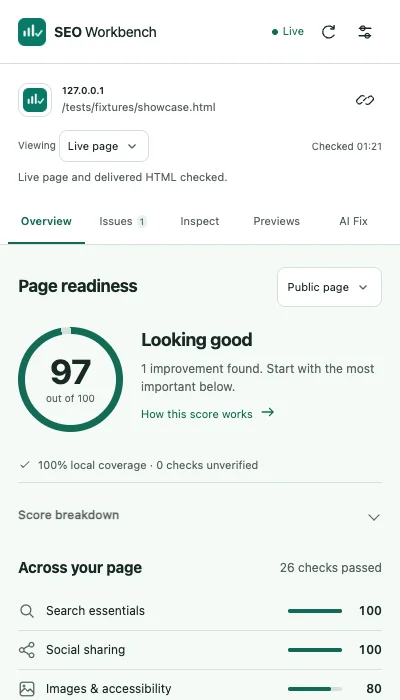
Find the issue.
Keep the evidence.
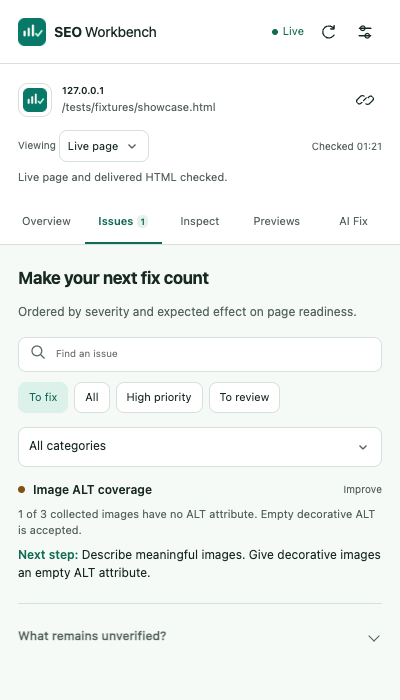
Titles, descriptions, canonicals, indexing directives, Open Graph, image ALT, links and JSON-LD syntax are checked locally. The most useful next steps appear first.
The readiness score explains its deductions and evidence coverage. Choose public or staging intent so deliberate restrictions get the right context, and compare delivered HTML with the JavaScript-updated page.
This is a local readiness score, not a Google score or a ranking prediction.
Check the first
impression.
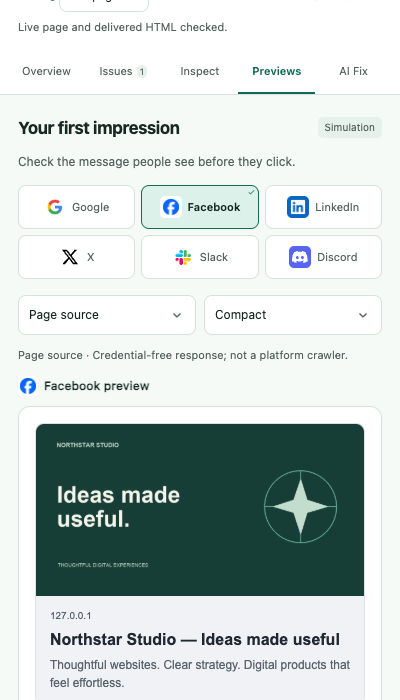
Switch between Google, Facebook, LinkedIn, X, Slack and Discord. Try a better title, description or sharing image, then copy the generated metadata for your website.
Recognizable platform logos make switching easy. Source details show where the preview gets its text, and drafts stay separate from the real page.
Previews are simulations. Platforms may rewrite text, crop images or use cached metadata.
A useful AI brief.
Without the data dump.
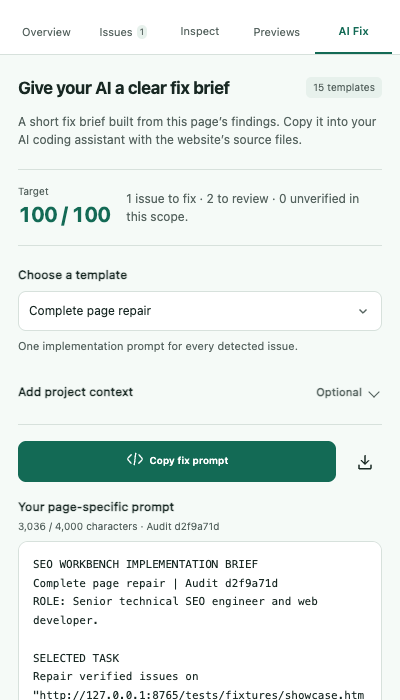
Turn findings into a page-specific fix prompt. All 15 templates use at most 4,000 characters, retaining issue IDs, essential evidence and clear verification steps.
Copy the brief to your chosen AI coding assistant with your actual project files. Use a focused template for metadata, images, links or structured data. Apply the changes, reload the page and measure the result.
Prompt generation runs locally. The extension does not contact an AI service or edit your website.
Keep your next audit
one click away.
The side panel keeps your page evidence, sharing previews and next fixes beside the website you’re working on.
Chrome Web Store link coming soon.
The extension listing link will appear here when it’s available.
Explore the featuresYour audit stays in your browser.
No account, subscription, API key, analytics or remote SEO model. Audits are held in browser-session storage; preferences and saved baselines remain on your device.
Automatic audits require access to HTTP(S) pages. The extension makes direct requests to inspected pages, site files, favicons and requested images or link destinations. These requests omit cookies, but destination servers receive normal network information.
Read the SEO Workbench privacy policyA few useful answers.
Is the score a guarantee of Google rankings?
No. It measures applicable local checks and explains unknown evidence. Indexing, rankings, backlinks, traffic and field Core Web Vitals are outside this page audit.
Does it need an external SEO API?
No. Analysis and prompt assembly use bundled local rules. The extension fetches site resources directly when needed; it has no SEO-service account, subscription or API key.
Does AI Fix make changes automatically?
No. Copy the generated brief into your chosen AI with the website source, review its changes and run a fresh audit. Nothing is sent to an AI automatically.
Can I inspect a pasted URL?
Yes. A pasted URL checks a fresh, credential-free HTML response without executing page JavaScript. It can differ from an authenticated or rendered browser page.
Where can I get help?
Made by Lalit Bahel. Email hello@lalitbahel.com with the extension version and the steps needed to reproduce the issue. Review any page evidence before sharing it.